Abstract Pastel Rainbows Clipart: Soft Graphics
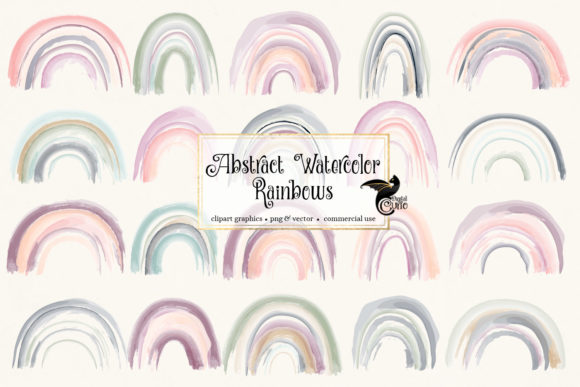
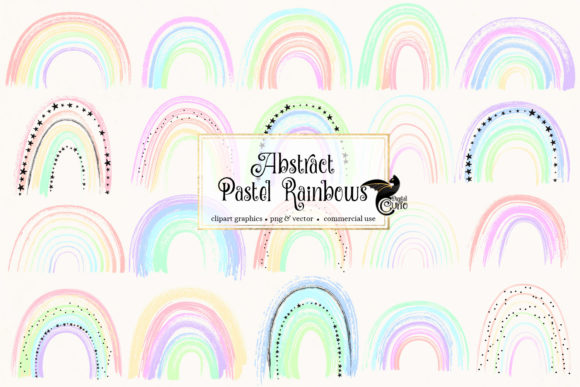
Last week, while pulling together a new spring collection for my Etsy shop, I picked up the Abstract Pastel Rainbows Clipart set. I needed gentle, versatile graphics that could work across nursery prints, editable Canva invitations, and a small batch of tote bag mockups—all without dominating the designs. The pack arrived as an instant download, containing 20 watercolor rainbow illustrations in two formats, and I spent an afternoon stress-testing it across my usual product lineup. Here’s what I found, what worked without a hitch, and where a little extra caution paid off.
Unpacking the Mood and Niche Appeal
The first thing that struck me was the hand-painted quality. Each rainbow has a soft, bleeding edge typical of real watercolor, not the flat digital gradients you often see in budget clipart. The pastel palette leans toward baby pinks, mint greens, buttery yellows, and lavender—a combination that instantly reads as child-friendly, whimsical, and trend-safe for baby shower decor, first birthday invitations, or feminine branding. I wouldn’t call it bold or modern; it’s more of a storybook aesthetic. For sellers targeting bohemian nursery themes, Easter printable bundles, or gentle self-care planners, this graphic design asset slots in naturally.
From a buyer psychology perspective, pastel rainbows have strong seasonal staying power. They reappear every spring, peak around Mother’s Day, and carry through to summer. I’ve also seen interest in the “rainbow” motif for pride-themed products, but the softness here is more suited to cozy, sentimental, and handmade branding than to loud statements. If your shop voice is calm, romantic, or sweet, this illustration set will reinforce that vibe.
File Formats and the Real-World Seller Advantage
The product description mentions 20 high-resolution 300 dpi PNG files and a matching vector SVG set. In practice, this dual format is a huge time-saver. The PNGs are ready to drag into Photoshop, Canva, or Procreate without any background removal—the transparency is clean, and I noticed no white halos around the edges when I layered them onto a blush pink backdrop. The SVG folder, on the other hand, opens up Cricut and Silhouette projects without tracing. I imported one rainbow into Cricut Design Space and it cut smoothly on cardstock, though I’ll talk more about tiny details later.
For print-on-demand, the 300 dpi resolution is non-negotiable. I tested a 9-inch nursery print at 300 dpi, and the watercolor texture stayed crisp, not pixelated. That’s a relief because nothing kills an Etsy review faster than a blurry “digital download” claim. The PNGs are large enough to scale down for planner stickers or up to a medium-sized wall art piece without losing that organic brushstroke feel. If you’re designing for mugs, onesies, or tote bags, you’ll have plenty of breathing room.
Testing the Look Inside Product Mockups
Before I ever list a printable design, I run it through a mockup simulation on three backgrounds: white, dark kraft, and a soft sage green. White backgrounds made the pastel colors sing; the tones stayed airy and clean, which is exactly what you want for a Canva template where the user will add their own text. On the dark kraft background, the lighter rainbows—especially the yellows and pinks—lost some contrast, and I had to adjust the opacity or add a subtle white outline. That’s not a dealbreaker, but it’s a reminder that this set is at its best in light, bright, or neutral layouts.
I also built a quick Etsy listing thumbnail using a rainbow as the central focal point inside a simple round frame. The visual hierarchy held up: the pastel colors drew the eye, a serif font added a storybook feel, and the listing felt clickable. For sellers who rely on thumbnail stop-power, a single, well-placed rainbow from this pack can be more effective than a cluttered collage.
Product Ideas That Fit the Aesthetic
After a few hours of trial, I’d confidently place this Abstract Pastel Rainbows Clipart into these digital product categories:
- Printable nursery wall art – Pair with a soft script font for a birth announcement or name print.
- Editable birthday invitations – Use one rainbow as a subtle header element in a Canva template.
- Greeting cards – Especially for baby showers, congratulations, or “thinking of you” designs.
- Planner stickers – The PNGs can be resized down to small functional stickers without losing readability.
- Social media graphics – Use as a gentle overlay for blog pin templates or Instagram story backgrounds.
- Scrapbooking kits – Combine with other pastel elements to create a cohesive digital or physical kit.
- Cricut projects – Cut the SVGs from adhesive vinyl for tumblers, or heat-transfer vinyl for baby onesies.
- Mug and tote bag sublimation – The watercolor texture gives a handmade feel on ceramics.
I also tested a quick print-on-demand arrangement on a youth t-shirt. The rainbow’s soft edges looked intentional, not like a printing error. For sellers using Printful or Printify, this is a major plus—watercolor designs often translate better to fabric than vector-heavy clipart that can look stiff.
Where to Use Caution and Pre-Test
While the flexibility is impressive, some applications require a bit more care. Tiny sticker details are one area. When I shrunk a full rainbow down to 0.5 inches for a sheet of mini journal stickers, the thin watercolor washes started to look muddy. The SVG path, while clean, didn’t hold up at that size either—the delicate arcs became too fine to cut neatly. For small stickers, I’d either use a bolder element from the set or stick to the PNGs at a slightly larger size.
I also noticed that dark backgrounds can swallow the lighter pastels. If you’re designing a product with a navy or black base, you’ll need to add a white outline or a gentle glow. Similarly, for layered vinyl cuts with Cricut, the SVG lines are thin by nature; I wouldn’t recommend using them for intricate, multi-color weeding projects unless you’re comfortable with a delicate weeding process.
Another consideration is text-heavy templates. Because the rainbows have a soft, painterly personality, they can get lost if you place them behind bold, thick fonts. I found that a thin handwritten font or a light serif works best, while a heavy sans-serif heading can overpower the illustration. In my test, a combination of “Raleway” (light) and a simple script kept the visual hierarchy balanced.
Organizing Files for Customer Satisfaction
As a seller, I’m obsessed with how a download looks when a buyer unzips it. I renamed the files into a clear sequence: “abstract-rainbow-01.png” through “abstract-rainbow-20.png”, and the SVG folder got a similar treatment. I’ve learned that if a customer opens a messy folder, the perceived value of the product drops instantly. For this digital download, I’d also include a quick reference sheet or a preview of all 20 rainbows in a single PDF, so buyers can see what they’re getting without opening each file.
If you plan to sell this clipart as a standalone design bundle or as part of a larger collection, clear labeling is even more critical. I’d package it with a simple commercial license note that explains permitted uses—print-on-demand, finished Canva templates, and physical product sales are generally fine, but always check the original license terms.
Commercial Licensing and Reselling Finished Products
Before integrating any graphic design asset into sold products, I dig into the license. The standard commercial clause for this illustration pack typically allows you to use the designs in flattened, finished products—like a printed t-shirt, a completed mug, or a finalized Canva template—but you cannot resell the raw PNGs or SVGs as-is. That’s industry standard and perfectly workable for a small business. I make sure to mention in my listings that the purchased item is a finished product, not a digital clipart file, to avoid any confusion.
How It Affects a Real Online Shop
From a pure business perspective, this pastel rainbow clipart can help build a brand identity without much effort. Because the watercolor style is consistent across all 20 elements, a collection of nursery prints, invitations, and social media templates will feel cohesive. That visual consistency encourages repeat buyers—someone who purchased a baby shower invitation might come back for a matching thank-you card or a milestone blanket design.
I also noticed that the soft, gentle aesthetic tends to perform well in the creative marketplace during spring and early summer. By pairing these rainbows with a few well-chosen font combinations and simple layouts, you can roll out a whole seasonal line in a day. For a print-on-demand seller, that speed to market is a real advantage.
However, I wouldn’t base an entire shop on this one asset. Pastel rainbows are a sub-niche, and they need to be refreshed with other themes to keep your catalog interesting. Use them as a building block for spring drops, but rotate in other motifs for autumn and winter.
Final Checklist for a Smooth Launch
When I’m close to hitting publish on a new product that uses this clipart, I run through a quick checklist. It saves me from typos, refund requests, and midnight design panics. I’d recommend the same for anyone working with the Abstract Pastel Rainbows Clipart:
- Test on a real mockup – Use Placeit or a photographed mockup to see how the rainbow looks in context.
- Check transparency – Open a PNG on a dark background to confirm the edges are clean.
- Print a sample – Even a quick home printer test can reveal color shifts and resolution issues.
- Verify SVG cut quality – Run a test cut on cardstock before listing a Cricut template.
- Preview as a thumbnail – Shrink your design to 200x200 pixels to see if the rainbow remains recognizable.
- Confirm license terms – Make sure the commercial license covers your intended use.
- Organize all files – Rename, sort, and include a preview sheet for buyers.
In the end, the Abstract Pastel Rainbows Clipart is a solid, low-risk addition to a digital seller’s toolkit. It’s not going to transform a shop overnight, but it does exactly what it promises: offers soft, high-quality watercolor rainbows that work across a wide range of digital products—from printable designs to sublimation designs and Canva templates. For around the price of a coffee, you get 20 ready-to-use illustrations that can dress up nursery art, invitations, and mockups with a consistent, gentle charm. If your product line leans toward the sweet, sentimental, and spring-ready, it’s worth a test run.